

What you get
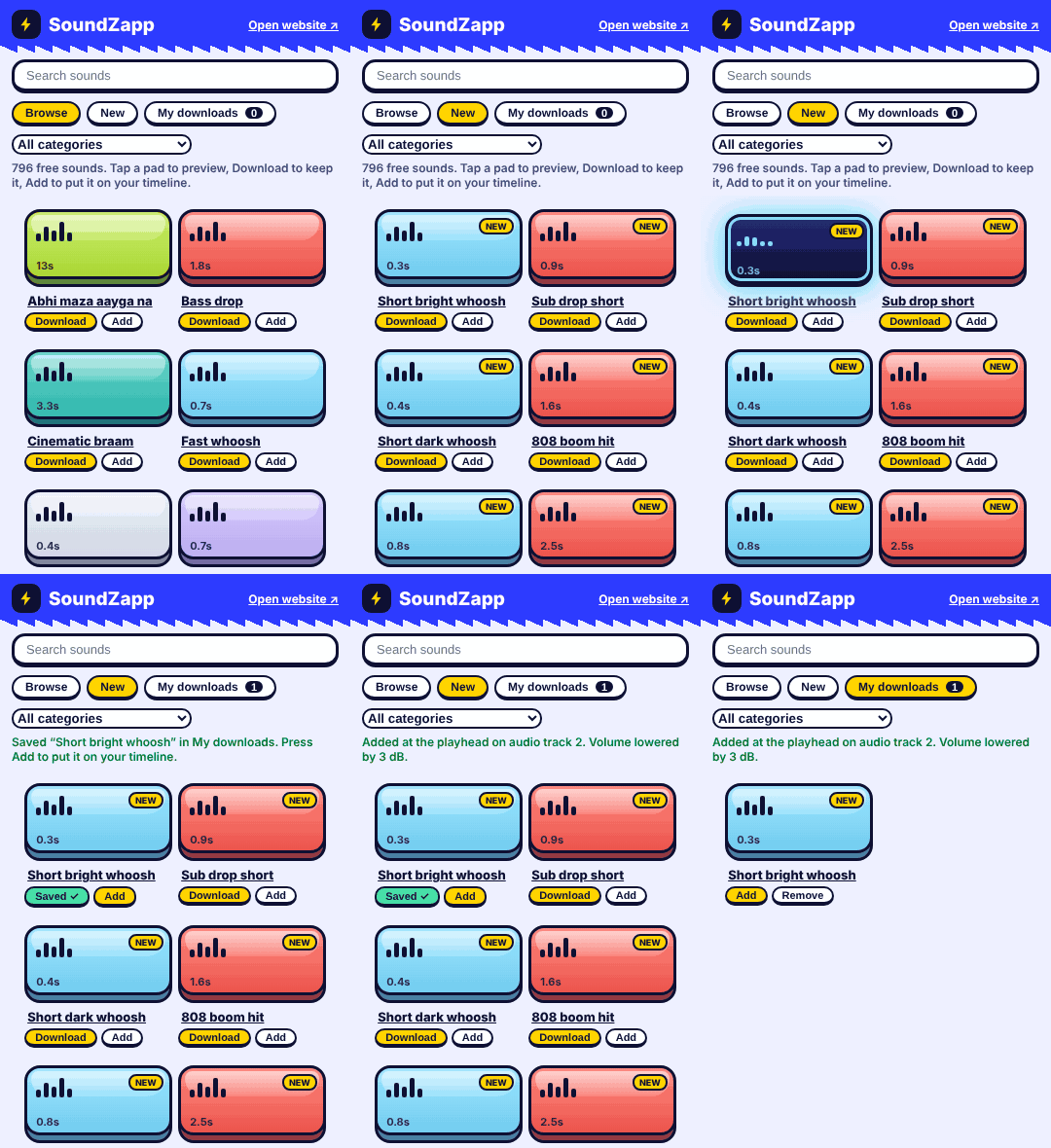
Hear it before you add it
Tap a pad and the sound plays right inside the panel. No tab switching, no guessing.
Add with one press
Press Add and the sound lands on your timeline at the playhead, on a free audio track.
Volume taken care of
Loud meme sounds are lowered a little as they go in. Quiet ones are left as they are.
Your own downloads tab
Press Download to keep a sound. Everything you saved sits in My downloads, ready to add again.
Always the latest sounds
All 796 sounds and every new one we add show up automatically, with a NEW badge.
Looks like the website
Same pads, same colors, same press-and-glow. It feels like SoundZapp, inside your editor.
Install it in 1 minute
- 1
Download it
Press the button, then open the zip in your Downloads folder (double-click it).
Download for Mac - 2
Open the installer
Double-click SoundZapp Installer and press Install.
- 3
If your Mac says it cannot verify the installer
This is normal for free apps. Open System Settings > Privacy & Security, scroll down, press Open Anyway next to SoundZapp Installer, then open the installer again.
- 4
Restart Premiere Pro or After Effects
Close it completely, open it again, then go to Window > Extensions > SoundZapp.
- 1
Download it
Press the button, then right-click the zip in your Downloads folder and choose Extract All.
Download for Windows - 2
Open the installer
Open the new folder, double-click Install SoundZapp. A small SoundZapp window opens: press Install. If Windows asks whether to run the file, press Run.
- 3
If Windows says “Windows protected your PC”
This is normal for free apps. Click More info, then Run anyway. If your browser asks first whether to keep the download, choose Keep.
- 4
Restart Premiere Pro or After Effects
Close it completely, open it again, then go to Window > Extensions > SoundZapp.
What the installer does
- Copies the SoundZapp panel into Adobe's extensions folder, inside your own user folder. It never asks for an admin password.
- Switches on the Adobe setting that lets free panels like this one open. Every free Adobe panel needs it.
- Does not touch your projects, your files or any other app.
Read the Mac installer
#!/bin/bash
# SoundZapp installer for Mac. Plain text: you can open this file in any text editor and read it.
# It copies the SoundZapp panel into Adobe's extensions folder (in your own user folder, no admin password)
# and switches on the Adobe setting that lets free panels like this one open. Nothing else is changed.
HERE="$(cd "$(dirname "$0")/.." && pwd)"
SRC="$HERE/Resources/com.soundzapp.panel"
DEST_ROOT="$HOME/Library/Application Support/Adobe/CEP/extensions"
DEST="$DEST_ROOT/com.soundzapp.panel"

say() { osascript -e "display dialog \"$1\" with title \"SoundZapp\" buttons {\"OK\"} default button \"OK\" with icon $2" >/dev/null 2>&1; }

ANSWER="$(osascript -e 'button returned of (display dialog "Install the free SoundZapp panel for Premiere Pro and After Effects?\n\nIt only adds a panel under Window > Extensions." with title "SoundZapp" buttons {"Cancel", "Install"} default button "Install" with icon note)' 2>/dev/null)"
[ "$ANSWER" = "Install" ] || exit 0

if [ ! -f "$SRC/CSXS/manifest.xml" ]; then
  say "The installer files are missing. Please download SoundZapp again from soundzapp.com/extension." stop
  exit 1
fi

if mkdir -p "$DEST_ROOT" \
  && rm -rf "$DEST" "$DEST_ROOT/com.soundzapp.aepanel" \
  && cp -R "$SRC" "$DEST" \
  && xattr -cr "$DEST" 2>/dev/null; [ -f "$DEST/CSXS/manifest.xml" ]; then
  # Allow panels that are not from the Adobe store (needed for any free panel)
  for v in 7 8 9 10 11 12 13 14 15 16; do
    defaults write com.adobe.CSXS.$v PlayerDebugMode 1
  done
  say "SoundZapp is installed.\n\nNow close Premiere Pro / After Effects completely and open it again.\nThen go to Window > Extensions > SoundZapp." note
else
  say "Sorry, the installation did not work. Please write to hello@soundzapp.com and we will help." stop
  exit 1
fi
Read the Windows installer
REM ---------- Install SoundZapp.bat ----------
@echo off
REM SoundZapp installer for Windows. Plain text: you can open this file in Notepad and read it.
REM It opens a small SoundZapp window by running "install-gui.ps1" (also plain text, in the same folder).
REM The panel is copied into Adobe's extensions folder in your own user folder (no admin rights),
REM and the Adobe setting that lets free panels open is switched on. Nothing else is changed.
title SoundZapp installer
set "HERE=%~dp0"
set "SRC=%HERE%com.soundzapp.panel"
set "DEST_ROOT=%APPDATA%\Adobe\CEP\extensions"

if not exist "%SRC%\CSXS\manifest.xml" (
  echo.
  echo   The installer cannot find the SoundZapp files next to it.
  echo   Please extract the whole zip first: right-click the zip, choose "Extract All",
  echo   then open "Install SoundZapp" from the new folder.
  echo.
  pause
  exit /b 1
)

REM Normal way: popups, no console text. Exit code 0 = finished or cancelled, anything else = fall back to the text version below.
powershell -NoProfile -ExecutionPolicy Bypass -WindowStyle Hidden -File "%HERE%install-gui.ps1"
if %errorlevel%==0 exit /b 0

echo.
echo   Installing the free SoundZapp panel for Premiere Pro and After Effects ...
echo.
if not exist "%DEST_ROOT%" mkdir "%DEST_ROOT%"
if exist "%DEST_ROOT%\com.soundzapp.aepanel" rmdir /s /q "%DEST_ROOT%\com.soundzapp.aepanel"
if exist "%DEST_ROOT%\com.soundzapp.panel" rmdir /s /q "%DEST_ROOT%\com.soundzapp.panel"
xcopy /e /i /y /q "%SRC%" "%DEST_ROOT%\com.soundzapp.panel" >nul
if not exist "%DEST_ROOT%\com.soundzapp.panel\CSXS\manifest.xml" (
  echo   Sorry, the installation did not work. Please write to hello@soundzapp.com and we will help.
  echo.
  pause
  exit /b 1
)

REM Allow panels that are not from the Adobe store (needed for any free panel)
for %%v in (7 8 9 10 11 12 13 14 15 16) do reg add "HKCU\Software\Adobe\CSXS.%%v" /v PlayerDebugMode /t REG_SZ /d 1 /f >nul

echo   ---------------------------------------------------------------
echo   SoundZapp is installed.
echo.
echo   Now close Premiere Pro / After Effects completely and open it again.
echo   Then go to:  Window ^> Extensions ^> SoundZapp
echo   ---------------------------------------------------------------
echo.
pause

REM ---------- install-gui.ps1 ----------
# SoundZapp installer for Windows: a small window with the SoundZapp logo, no black console. Plain text: you can read every line in Notepad.
# It copies the SoundZapp panel into Adobe's extensions folder (in your own user folder, no admin rights)
# and switches on the Adobe setting that lets free panels like this one open. Nothing else is changed.
$ErrorActionPreference = "Stop"
try {
  Add-Type -AssemblyName System.Windows.Forms
  Add-Type -AssemblyName System.Drawing
  [System.Windows.Forms.Application]::EnableVisualStyles()

  $blue   = [System.Drawing.Color]::FromArgb(45, 59, 255)
  $ink    = [System.Drawing.Color]::FromArgb(14, 16, 51)
  $yellow = [System.Drawing.Color]::FromArgb(255, 212, 0)
  $paper  = [System.Drawing.Color]::FromArgb(238, 240, 255)

  # The SoundZapp bolt logo, drawn here so no extra picture file is needed
  function New-Logo([int]$size) {
    $bmp = [System.Drawing.Bitmap]::new($size, $size)
    $g = [System.Drawing.Graphics]::FromImage($bmp)
    $g.SmoothingMode = [System.Drawing.Drawing2D.SmoothingMode]::AntiAlias
    $d = [int]($size * 0.44)
    $path = [System.Drawing.Drawing2D.GraphicsPath]::new()
    $path.AddArc(0, 0, $d, $d, 180, 90)
    $path.AddArc($size - $d - 1, 0, $d, $d, 270, 90)
    $path.AddArc($size - $d - 1, $size - $d - 1, $d, $d, 0, 90)
    $path.AddArc(0, $size - $d - 1, $d, $d, 90, 90)
    $path.CloseFigure()
    $g.FillPath([System.Drawing.SolidBrush]::new($ink), $path)
    $k = $size / 24 * 0.78
    $o = $size * 0.11
    $p = @(13.5, 2, 4.5, 13.5, 10, 13.5, 9, 22, 18, 10.5, 12.5, 10.5)
    $pts = New-Object 'System.Drawing.PointF[]' 6
    for ($i = 0; $i -lt 6; $i++) {
      $pts[$i] = [System.Drawing.PointF]::new([single]($p[2 * $i] * $k + $o), [single]($p[2 * $i + 1] * $k + $o))
    }
    $g.FillPolygon([System.Drawing.SolidBrush]::new($yellow), $pts)
    $g.Dispose()
    return $bmp
  }

  $src = Join-Path $PSScriptRoot "com.soundzapp.panel"
  $destRoot = Join-Path $env:APPDATA "Adobe\CEP\extensions"

  $form = New-Object System.Windows.Forms.Form
  $form.Text = "SoundZapp installer"
  $form.ClientSize = New-Object System.Drawing.Size(480, 300)
  $form.StartPosition = "CenterScreen"
  $form.FormBorderStyle = "FixedDialog"
  $form.MaximizeBox = $false
  $form.MinimizeBox = $false
  $form.BackColor = $paper
  $form.Font = New-Object System.Drawing.Font("Segoe UI", 10)
  $form.Icon = [System.Drawing.Icon]::FromHandle((New-Logo 32).GetHicon())

  $head = New-Object System.Windows.Forms.Panel
  $head.Dock = "Top"
  $head.Height = 84
  $head.BackColor = $blue
  $form.Controls.Add($head)

  $logo = New-Object System.Windows.Forms.PictureBox
  $logo.Image = New-Logo 52
  $logo.SizeMode = "AutoSize"
  $logo.Location = New-Object System.Drawing.Point(24, 16)
  $logo.BackColor = $blue
  $head.Controls.Add($logo)

  $name = New-Object System.Windows.Forms.Label
  $name.Text = "SoundZapp"
  $name.ForeColor = [System.Drawing.Color]::White
  $name.BackColor = $blue
  $name.Font = New-Object System.Drawing.Font("Segoe UI", 20, [System.Drawing.FontStyle]::Bold)
  $name.AutoSize = $true
  $name.Location = New-Object System.Drawing.Point(88, 20)
  $head.Controls.Add($name)

  $body = New-Object System.Windows.Forms.Label
  $body.ForeColor = $ink
  $body.Location = New-Object System.Drawing.Point(24, 104)
  $body.Size = New-Object System.Drawing.Size(432, 120)
  $body.Text = "Install the free SoundZapp panel for Premiere Pro and After Effects?`r`n`r`nIt copies the panel into your own Adobe extensions folder (no admin password needed) and switches on the Adobe setting that lets free panels open. Nothing else on your computer is changed."
  $form.Controls.Add($body)

  function New-Button([string]$text, [int]$x, [bool]$primary) {
    $b = New-Object System.Windows.Forms.Button
    $b.Text = $text
    $b.Size = New-Object System.Drawing.Size(130, 38)
    $b.Location = New-Object System.Drawing.Point($x, 244)
    $b.FlatStyle = "Flat"
    $b.FlatAppearance.BorderSize = 2
    $b.FlatAppearance.BorderColor = $ink
    $b.ForeColor = $ink
    $b.Font = New-Object System.Drawing.Font("Segoe UI", 10, [System.Drawing.FontStyle]::Bold)
    if ($primary) { $b.BackColor = $yellow } else { $b.BackColor = [System.Drawing.Color]::White }
    return $b
  }
  $btnInstall = New-Button "Install" 196 $true
  $btnCancel  = New-Button "Cancel" 332 $false
  $form.Controls.Add($btnInstall)
  $form.Controls.Add($btnCancel)
  $form.AcceptButton = $btnInstall
  $form.CancelButton = $btnCancel

  $btnCancel.Add_Click({ $form.Close() })
  $btnInstall.Add_Click({
    $btnInstall.Enabled = $false
    $btnCancel.Enabled = $false
    $body.Text = "Installing ..."
    $form.Refresh()
    try {
      if (-not (Test-Path (Join-Path $src "CSXS\manifest.xml"))) { throw "The SoundZapp files are missing. Please extract the whole zip first (right-click the zip, Extract All)." }
      New-Item -ItemType Directory -Force -Path $destRoot | Out-Null
      foreach ($old in @("com.soundzapp.panel", "com.soundzapp.aepanel")) {
        $p = Join-Path $destRoot $old
        if (Test-Path $p) { Remove-Item $p -Recurse -Force }
      }
      Copy-Item $src (Join-Path $destRoot "com.soundzapp.panel") -Recurse
      if (-not (Test-Path (Join-Path $destRoot "com.soundzapp.panel\CSXS\manifest.xml"))) { throw "The files could not be copied." }
      # Allow panels that are not from the Adobe store (needed for any free panel)
      foreach ($v in 7..16) {
        $key = "HKCU:\Software\Adobe\CSXS.$v"
        New-Item -Path $key -Force | Out-Null
        New-ItemProperty -Path $key -Name "PlayerDebugMode" -Value "1" -PropertyType String -Force | Out-Null
      }
      $body.Text = "SoundZapp is installed.`r`n`r`nNow close Premiere Pro / After Effects completely and open it again.`r`n`r`nThen go to:  Window > Extensions > SoundZapp"
    } catch {
      $body.Text = "Sorry, the installation did not work.`r`n`r`n" + $_.Exception.Message + "`r`n`r`nPlease write to hello@soundzapp.com and we will help."
    }
    $btnInstall.Visible = $false
    $btnCancel.Text = "Close"
    $btnCancel.Location = New-Object System.Drawing.Point(326, 244)
    $btnCancel.BackColor = $yellow
    $btnCancel.Enabled = $true
    $form.AcceptButton = $btnCancel
  })

  $form.TopMost = $true
  [void]$form.ShowDialog()
  exit 0
} catch {
  # The window could not be shown on this computer: the .bat file continues with the plain text version.
  exit 1
}
Questions
Is it really free?
Yes. The panel is free, there is no account and no sign-up. It has no ads.
Where do I find it after installing?
Close Premiere Pro or After Effects completely, open it again, then go to Window > Extensions > SoundZapp.
It does not show up under Window > Extensions
Quit the app completely (not just the project) and open it again. If it is still missing, run the installer once more. The panel needs Premiere Pro 2020 or newer, or After Effects 2018 or newer.
My Mac or Windows says it cannot verify the installer. Is that normal?
Yes. Mac and Windows show this message for any free app whose maker has not paid for a code-signing certificate. The steps above show how to continue. The installer is two short plain-text files, and you can read all of it in the “What the installer does” section above.
If you would rather not open the installer at all, you can use this one-line install instead. It does exactly the same thing.
Mac: open Terminal, paste this line and press Enter.
curl -fsSL https://soundzapp.com/ext/install-mac.sh | bashWindows: open PowerShell, paste this line and press Enter.
irm https://soundzapp.com/ext/install-windows.ps1 | iexWhat does Add do?
In Premiere Pro it places the sound at the playhead, on the first audio track that is free at that spot. In After Effects it adds the sound as a layer in the open composition. Loud sounds are lowered a little when you press Add, and quiet ones are left alone, so you do not have to turn them down every time.
Can I use the sounds in my videos?
Every sound has its own license on its page. In the panel, click a sound's name to open its page and check it.
Does it update itself?
Yes. When a new version is out, the panel shows a short pop-up with Update now and Not now. New sounds on the website show up in the panel by themselves, with a NEW badge.
Does it work in DaVinci Resolve?
Not at the moment. It works in Premiere Pro and After Effects.
Adobe, Premiere Pro and After Effects are trademarks of Adobe Inc. SoundZapp is an independent free panel and is not made or endorsed by Adobe.